HTTP Status Checker: Instantly Diagnose Any URL Response
Free HTTP status checker. Check any URL's status code, trace redirect chains hop by hop, and fix 404, 301 and 500 errors before they silently hurt your SEO.
Introduction
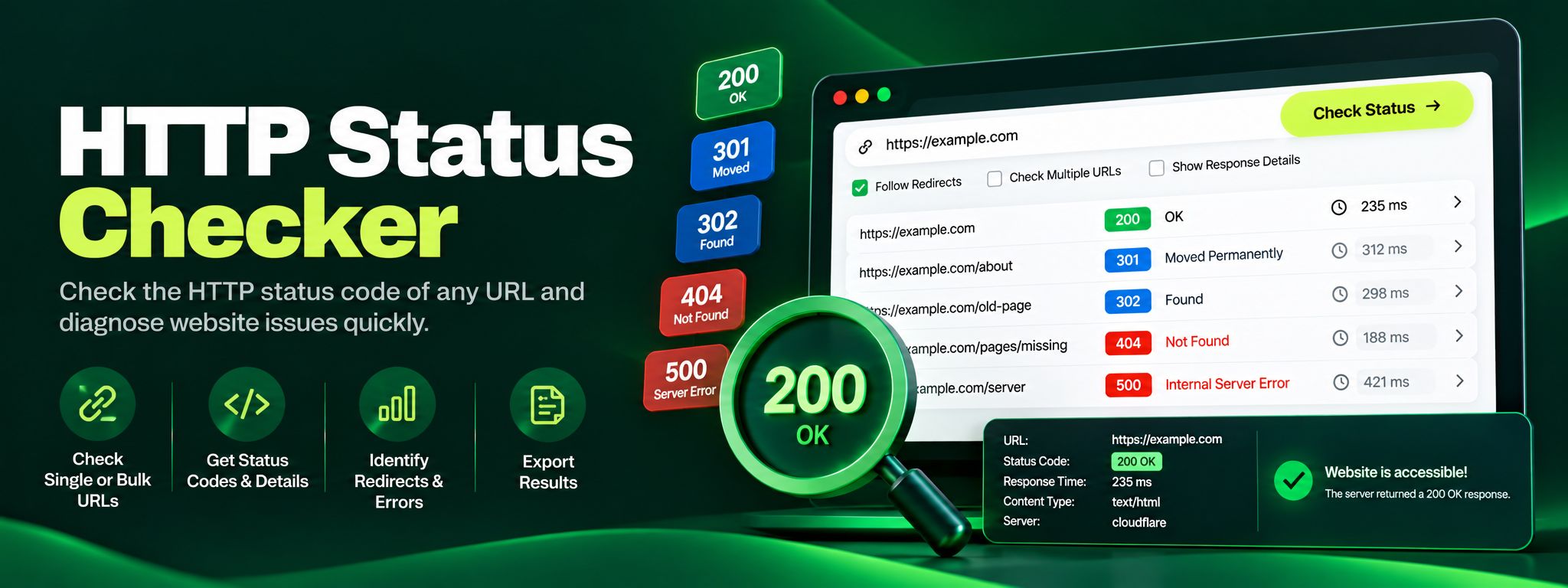
Every time a browser or a search engine crawler visits a web page, the server answers with a three digit HTTP status code. That tiny number decides whether the visitor sees your content, gets redirected somewhere else, or lands on a broken page. A 200 means everything is fine. A 301 means the page has permanently moved. A 404 means it is gone, and a 500 means your server is in trouble. These codes run quietly behind every website on the internet, and most site owners never check them until something breaks.
The problem is that status code problems rarely announce themselves. A page you deleted months ago might still be linked from Google search results, sending visitors to a 404 page. A redirect chain might bounce users through three or four hops before they reach the content, slowing down your site and leaking SEO value at every step. Your checkout page might return a soft error that only shows up for certain users.
The ZaxisMedia HTTP Status Checker gives you a fast, free way to see exactly what any URL returns, including the full redirect chain hop by hop, so you can catch these issues in seconds instead of discovering them through lost traffic.
This tool is built for SEO specialists, web developers, digital marketers, and website owners who need quick answers without opening developer tools or installing browser extensions. Whether you are auditing a client site, migrating a domain, or simply wondering why a page is not ranking, checking its HTTP status is always the right first step.
Why this matters
Explain the benefits to the reader.
SEO signals start here
HTTP status codes are the foundation of how search engines understand your site. Google treats a 301 redirect as a signal to transfer ranking power to the new URL, a 404 as a signal that the page is gone, and a 500 as a sign that your site may be unreliable. When these signals are wrong, your rankings suffer even if your content is excellent. Regular status checks are one of the cheapest forms of SEO insurance you can buy, and with a free tool like this one, they cost nothing at all.
Real users feel every error
Beyond SEO, status codes affect real users every day. A visitor who clicks a link and hits a 404 page usually leaves and rarely comes back. A redirect loop makes your site look broken. A slow chain of redirects adds precious seconds to page loads on mobile connections. By making status code checks a habit, before launches, after migrations, and during routine audits, you protect both your search visibility and the experience of every person who visits your website.
Helpful details
Instant status code lookup: Enter any URL and see its HTTP status code in seconds, with no signup or installation required.
Full redirect chain tracing: Watch the complete redirect path hop by hop, from the original URL to the final destination, with the status code of every step.
Plain English explanations: Every status code comes with a clear explanation of what it means, so you do not need to memorize the HTTP specification.
Redirect loop detection: Spot infinite redirect loops that trap browsers and crawlers before your visitors get stuck in them.
Broken link diagnosis: Quickly confirm whether a URL returns a 404 or 410, and see exactly where a chain breaks.
Server error identification: Distinguish between 500, 502, 503, and 504 errors so you can point your hosting provider or developer in the right direction.
Free and unlimited: Run as many checks as you need, on any public URL, without accounts or usage limits.
Works on any device: The checker runs entirely in your browser, so it works the same on desktop, tablet, and mobile.
Imagine you run an online store and you recently redesigned your website. During the redesign, your category URLs changed from /shop/shoes to /collections/shoes. You set up redirects, but a month later your organic traffic to those pages has dropped by 40 percent. Something is wrong, but your pages look fine when you visit them in your browser. You paste one of the old URLs into the HTTP Status Checker and discover the problem in seconds. The old URL returns a 301 redirect to an intermediate URL, which returns another 301, which returns a third 301 before finally landing on the new page. That is a three hop redirect chain. Every extra hop slows down the page load and dilutes the SEO authority passed from the old URL. Worse, one of the intermediate URLs is missing a trailing slash variant, which means some links from external sites hit a 404 instead of redirecting at all.
With this diagnosis in hand, the fix is straightforward. You update your redirect rules so the old URLs point directly to the final destination in a single 301 hop, and you add the missing variant. You re-run the checker, see a clean single hop 301 followed by a 200, and over the following weeks your traffic recovers. Without the status checker, you might have spent days guessing at analytics data or waiting for a developer to investigate.
Step-by-step guide
Open the HTTP Status CheckerOpen the HTTP Status Checker tool page and bookmark it for regular audits.
Paste the URLPaste the URL you want to check into the input field. Include the full address starting with https://, for example https://example.com/old-page.
Click the check buttonClick the check button to start the lookup. The tool sends a request to the URL just like a browser would.
Read the status codeRead the status code shown in the result card. A green 200 means the page loads fine. Anything else deserves a closer look.
Review the redirect chainReview the redirect chain if one is shown. Each hop lists the URL and its status code in order, so you can see exactly how the request travelled.
Follow the explanationFollow the explanation attached to each code. If the tool flags a 404 or a long redirect chain, it tells you what that means for your site in plain language.
Fix and re-checkFix what you find, then run the check again to confirm the fix worked. Re-checking after changes is how you close the loop.