Security Headers Checker: Grade Your Site's Defenses
Free security headers checker. Instantly scan HSTS, CSP, X-Frame-Options and more on any site, get an A to F grade and clear steps to fix every website gap.
Introduction
Most website owners think about security in terms of passwords, plugins, and SSL certificates. But there is a whole layer of protection that sits quietly in your server responses, invisible to visitors yet critical to safety: HTTP security headers. These are small instructions your server sends with every page, telling browsers how to behave. They can prevent clickjacking attacks, block malicious scripts, force encrypted connections, and stop your site from being framed by attackers. When they are missing, your site is exposed to entire categories of attacks that no password can prevent.
The scary part is that the vast majority of websites are missing most of these headers. Studies consistently show that even popular, well maintained sites fail basic security header checks. The reason is simple: headers are invisible. Nothing looks broken when they are absent, so nobody notices.
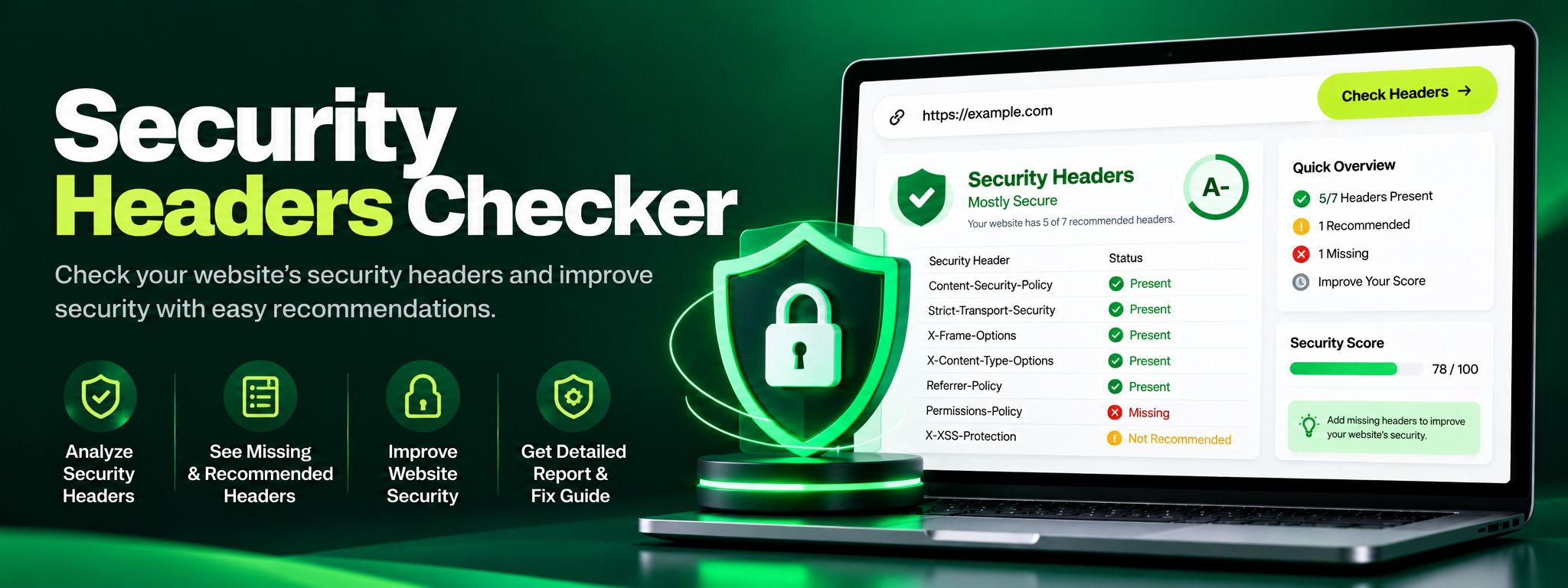
The ZaxisMedia Security Headers Checker makes the invisible visible. Paste in any URL and within seconds you get a clear A to F grade, a detailed breakdown of every important header, and practical recommendations for fixing what is missing. Whether you are a developer hardening a new deployment, an agency auditing client sites, or a business owner who wants to know if your site is safe, this tool turns a complex security topic into a simple, actionable report.
Why this matters
Explain the benefits to the reader.
High value, low effort
Security headers are one of the highest value, lowest effort improvements you can make to a website. Adding them requires no redesign, no new software, and no ongoing maintenance. A few lines in your server configuration can block clickjacking, cross site scripting, MIME sniffing attacks, and protocol downgrade attacks. Yet because the benefit is invisible, these headers are the first thing skipped under deadline pressure. A checker tool closes that gap by making the missing protection impossible to ignore.
Trust as a business asset
There is also a trust and business angle. Visitors may never inspect your headers, but security conscious clients, partners, and auditors do. A public facing security grade is increasingly part of due diligence, especially for agencies, SaaS products, and e-commerce stores handling customer data. Scanning your headers regularly and keeping an A grade is a simple, provable way to show that you take security seriously, and it costs you nothing but a few minutes.
Helpful details
Instant A to F security grade: Get a single, easy to understand grade that summarizes your site's header security posture.
Comprehensive header coverage: Checks HSTS, Content Security Policy, X-Frame-Options, X-Content-Type-Options, Referrer-Policy, Permissions-Policy and more.
Missing header detection: Clearly flags every recommended header that is absent from your server responses.
Misconfiguration warnings: Spots headers that are present but set to weak or incorrect values, which can be worse than missing ones.
Plain language fix recommendations: Each finding includes practical guidance on what the header does and how to add it correctly.
No signup required: Run unlimited scans on any public website without creating an account.
Server side scanning: The check runs from our servers, so results reflect what real visitors and attackers actually receive.
Perfect for client reports: Use the grade and findings as evidence in security audits and client presentations.
Consider a freelance developer who just launched a portfolio site for a new client, a small law firm. The site looks polished, loads fast, and has an SSL certificate, so everyone assumes it is secure. Before handing over the project, the developer runs the firm's domain through the Security Headers Checker out of habit. The result is a D grade. The scan reveals that the site is missing a Content Security Policy entirely, has no X-Frame-Options header, and its HSTS configuration is incomplete. In practical terms, this means an attacker could embed the law firm's contact form inside a malicious page using an invisible iframe, tricking visitors into submitting sensitive legal inquiries to the wrong place. It also means browsers are not forced to use HTTPS on every request, leaving a window for downgrade attacks on public WiFi.
The developer adds the missing headers to the server configuration, a task that takes about twenty minutes, and re-scans. The grade jumps to an A. When presenting the finished site, the developer includes the before and after grades in the handover report. The client is impressed, the site is genuinely safer, and the developer has a documented security win that justifies their fee. All of it started with a free thirty second scan.
Step-by-step guide
Open the checker.Open the Security Headers Checker tool page and locate the URL input field.
Enter the URL.Enter the website URL you want to scan, starting with https://. You can scan your own site or any public website.
Start the scan.Start the scan with one click. The tool fetches the site's HTTP response headers the same way a browser would.
Read your grade.Read your A to F grade at the top of the results. An A means strong header security, while D or F means urgent gaps need attention.
Review each finding.Review each header finding in the detailed breakdown. Green means the header is present and well configured, red means it is missing or weak.
Follow the fix recommendations.Follow the fix recommendations for every red finding. Each one explains the header's purpose and shows the correct value to set.
Apply fixes and re-scan.Apply the fixes on your server or ask your developer or hosting provider to add them, then re-scan to watch your grade improve.