SSL Certificate Checker: Verify Expiry and Validity Free
Free SSL certificate checker: verify any website's certificate issuer, expiry date, days remaining, covered domains and fingerprint. Avoid expiry outages.
Introduction
That little padlock in your browser's address bar carries enormous weight. It tells visitors their connection is encrypted, their passwords are safe, and your site is who it claims to be. But SSL certificates expire, and when one does, browsers do not show a gentle reminder. They show a full page security warning that sends most visitors running. Some of the world's biggest companies have suffered embarrassing outages for exactly this reason: someone forgot to renew a certificate.
An SSL certificate is a digital document that proves a website's identity and enables encrypted HTTPS connections. Every certificate has a validity window with a hard expiry date, typically 90 days for free Let's Encrypt certificates or one year for commercial ones. Monitoring those dates across all your domains is one of the least glamorous and most important jobs in running websites.
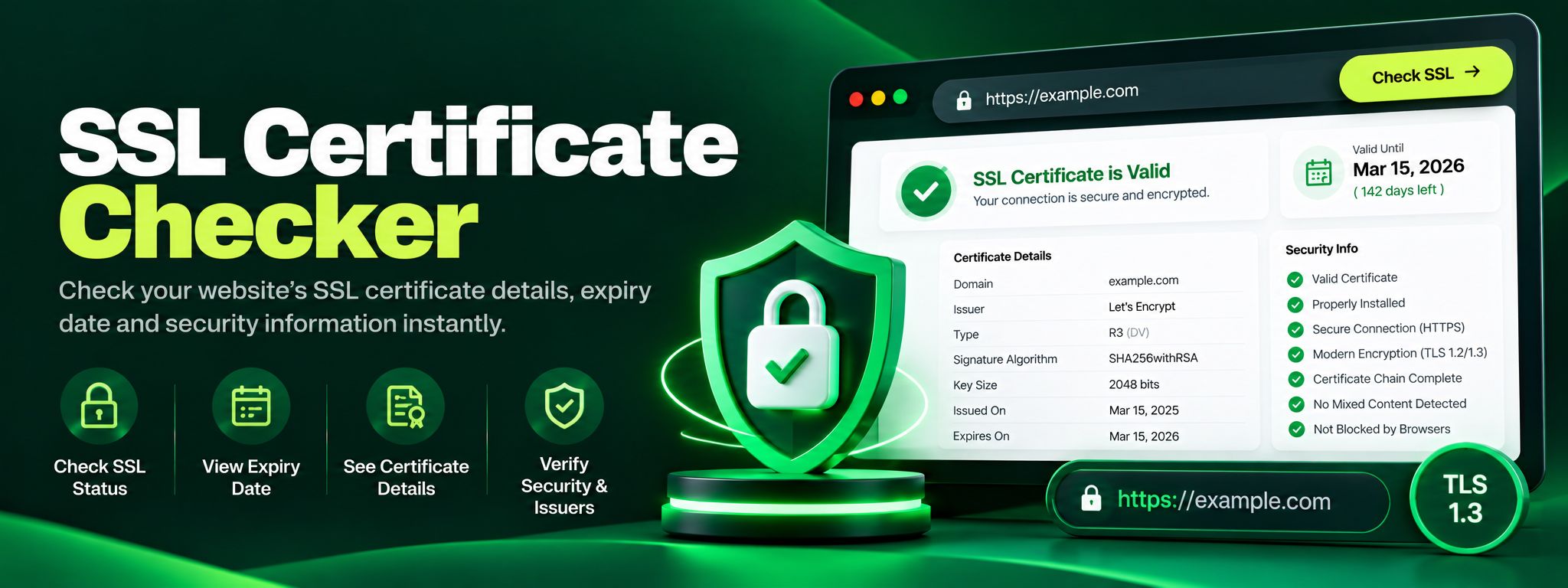
The SSL Certificate Checker by ZaxisMedia makes that job effortless. Enter any domain and the tool opens a real TLS connection, retrieves the live certificate, and reports everything that matters: whether it is currently valid, who issued it, when it expires and how many days remain, every domain name it covers, and its unique SHA-256 fingerprint. It is free, instant, and requires no sign-up.
Why this matters
Explain the benefits to the reader.
Expiry looks like a security failure
Certificate expiry outages are uniquely damaging because they look like security failures to visitors. A site that is merely down shows an error, but a site with an expired certificate shows a frightening warning about attackers. Visitors do not think "their admin forgot to renew", they think "this site is dangerous", and many never come back. For ecommerce sites, even a few hours of warnings directly translates into lost revenue and damaged trust.
Verify, don't just trust
Beyond expiry, certificates deserve verification, not blind trust. Before entering payment details on an unfamiliar store, a quick check confirms the certificate is genuinely issued to that business and covers the domain you are on. For site owners, periodically verifying issuer and covered domains catches misconfigurations, like a new subdomain launched without being added to the certificate, before customers or search engines notice.
Helpful details
Real TLS handshake. The tool connects to the site on port 443 and reads the actual certificate being served, not a cached or estimated copy, so the results reflect reality.
Clear validity verdict. See at a glance whether the certificate is valid right now, so there is never any ambiguity about a site's security status.
Expiry date and days remaining. Know exactly when the certificate expires and how many days you have left, the two numbers that prevent surprise outages.
Issuer identification. See which certificate authority issued the certificate, from Let's Encrypt to commercial providers, useful for auditing and trust verification.
Covered domains list. View every Subject Alternative Name on the certificate, so you can confirm that www, subdomains and alternates are all protected.
SHA-256 fingerprint. Get the certificate's unique hash, which lets security conscious users detect unexpected certificate changes or man in the middle interference.
Free and unlimited. Check as many domains as you like, as often as you like, with no account and nothing to install.
A digital agency manages forty client websites, most running on auto renewing Let's Encrypt certificates. Auto renewal works beautifully until the day it silently fails on one site because a firewall rule changed and blocked the renewal challenge. Nobody notices for weeks. During a routine monthly check, the agency's developer runs the agency's own domain list through the SSL Certificate Checker. Thirty nine sites show healthy certificates with 60 plus days remaining. One client site shows 4 days remaining. That single number triggers immediate action: the developer fixes the firewall rule, forces a renewal, and re-checks. The new certificate shows 90 days remaining and a fresh validity verdict. Without that check, the certificate would have expired on a Friday night, and the client's customers would have spent the weekend staring at browser security warnings instead of placing orders. The entire incident, from detection to fix, took twenty minutes and cost nothing. That is the return on investment of a free certificate check done regularly.
Step-by-step guide
Enter the domain.Type the domain or hostname you want to check, for example example.com, into the input field. You can check your own sites or any site on the internet.
Click "Check SSL certificate".The tool opens a secure TLS connection to the host and downloads the certificate it presents.
Read the validity status.The headline result tells you immediately whether the certificate is valid. A valid status means the certificate is current, properly issued and trusted.
Check the expiry details.Note the exact expiry date and the days remaining. If the number is small, put renewal on your calendar today, not tomorrow.
Review the issuer and covered domains.Confirm the issuer is who you expect, and scan the list of covered domains to make sure every hostname you serve, including www and subdomains, is on the certificate.
Compare the fingerprint when it matters.If you are verifying a high value site or debugging a suspected interception, compare the SHA-256 fingerprint against the known good value. Any unexpected change deserves investigation.