Technology Stack Detector: Reveal Any Website's Tech Stack
Discover the technology stack behind any website in seconds. Our free Technology Stack Detector uncovers CMS, frameworks, hosting, and analytics instantly.
Introduction
Every website you admire is built on a stack of technologies: a content management system, a JavaScript framework, a web server, an analytics platform, and often a dozen smaller libraries working quietly in the background. Knowing exactly which technologies power a site is valuable intelligence. It tells you what is possible, what is proven, and what competitors trust with their own business.
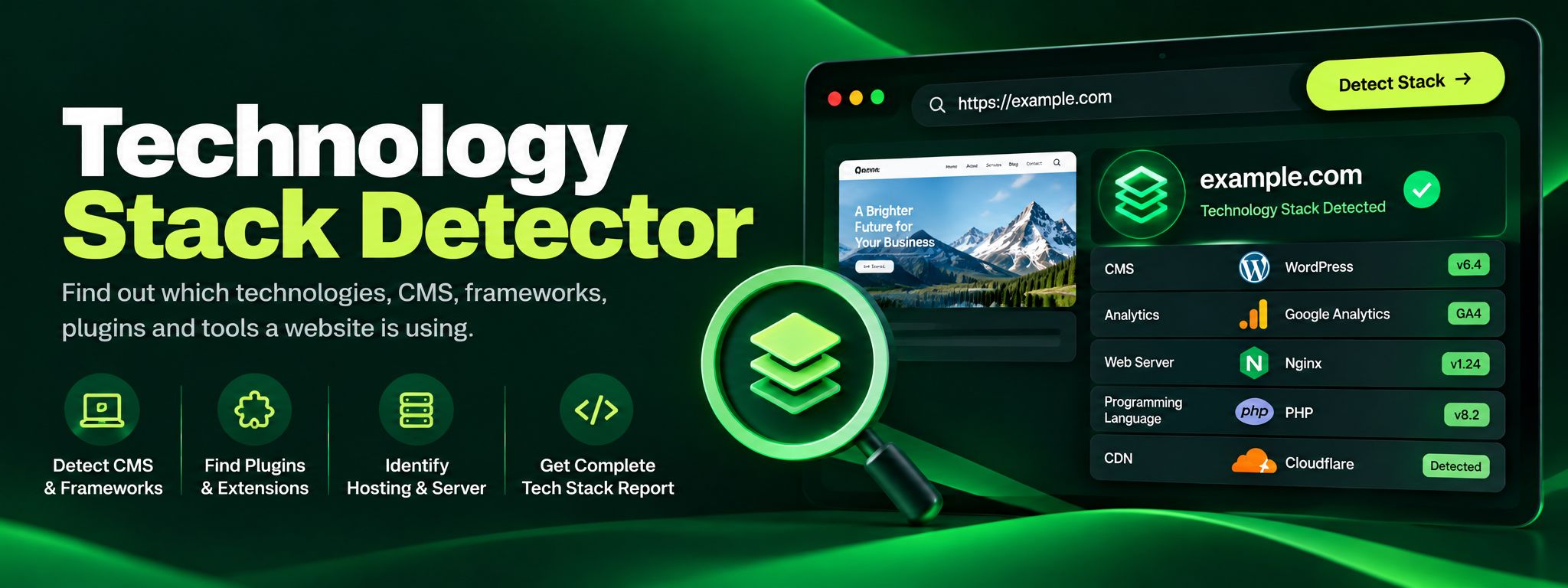
The ZaxisMedia Technology Stack Detector answers that question in seconds. Paste any URL into the tool, run the check, and you get a clear breakdown of the technologies detected on the site. There is no installation, no signup, and no cost. It works right in your browser and is free to use as often as you like.
This tool is built for developers researching implementation options, marketers auditing competitors, freelancers validating client claims, and curious site owners who want to understand what is running under the hood of their own pages.
Why this matters
Seeing the exact tools behind any website gives you a shortcut to technology choices that already work in the real world.
For personal projects
Rebuild the features you admire using the same libraries and frameworks the professionals chose.
For business and team use
Research competitor stacks, validate vendor claims, and brief your developers with concrete examples.
Helpful details
Instant detection of the CMS powering a site, such as WordPress, Shopify, Webflow, or a custom build.
Identification of JavaScript frameworks and libraries, including React, Vue, Angular, and jQuery.
Web server and hosting technology recognition, so you can see the infrastructure behind the site.
Analytics and tracking platform detection, revealing tools like Google Analytics or Tag Manager.
Advertising and marketing technology identification, useful for competitive research.
Clean, readable results grouped by category instead of a raw technical dump.
Completely free with unlimited checks and no account required.
Fast server side analysis that works on any public URL you enter.
Imagine you are a freelance web developer and a potential client asks you to rebuild their competitor's booking website. The competitor's site loads fast, looks polished, and has a smooth reservation flow. Before quoting the project, you run the site through the Technology Stack Detector. Within seconds you learn it runs on WordPress with a specific booking plugin, uses Cloudflare for caching, and tracks conversions with Google Tag Manager.
That single check changes your entire proposal. Instead of guessing at a custom build that would take months, you can quote a WordPress based solution with the same plugin stack, delivered in weeks at a fraction of the cost. You also know exactly which performance tools to replicate. This is the practical power of stack detection: it turns guesswork into a concrete, evidence based plan. Beyond the proposal, the detector keeps helping during the build. When the client later asks for a feature the competitor has, you can re-check the competitor's stack to see which plugin or service powers it. This keeps your rebuild aligned with proven choices instead of custom code that is harder to maintain. Over a year of client work, this habit of checking stacks before quoting saves dozens of hours and prevents costly mismatches between what was promised and what is practical to deliver.
Step-by-step guide
Open the toolOpen the Technology Stack Detector page on ZaxisMedia.
Copy the website URLCopy the full URL of the website you want to analyze, for example https://example.com.
Paste the URLPaste the URL into the input field on the tool page.
Click the detect buttonClick the detect button to start the analysis.
Wait for the scanWait a few seconds while the tool fetches the page and scans its code, headers, and scripts.
Review the resultsReview the results, which are grouped into categories like CMS, frameworks, analytics, and hosting.
Use the findingsUse the findings to guide your own technology choices or competitive research.